Design System
Website Redesign
AI Native
brandwick design system
Built from scratch, a complete, scalable component library for a full website overhaul. Every token, every variant, every state defined before a single page was designed.
Year :
2025 - Present
Role :
● UX Designer
● Web Developer
Team :
● UX Designer (me!)
● 2 Developers
Skills :
● AI Workflow
● UX Research
● Web Development
● Prototyping
The Approach
System before screens.
Most website projects start with wireframes. This one started with tokens. Before a single page was designed, the entire design language, colors, type, spacing, components, was locked in and connected through Figma Variables.
Phase 1
FOUNDATIONS
Color palette, type scale, spacing system, all defined as Figma Variables with semantic naming, so changes cascade everywhere automatically.
Phase 2
COMPONENTS
Atoms to organisms; every component built with Auto Layout, connected to tokens, and shipped with all interactive states from day one.
Phase 3
PAGES
Only after the system was stable did page design begin. Landing page was the first stress-test, everything snapped into place.
AI-Native Workflow
How I used Claude Code + Figma MCP.
This project was built with an AI-assisted workflow from the start, not as a shortcut, but as a force multiplier for doing more rigorous system work faster.
Claude Code

→ Generated token naming conventions and variable collection structures at scale
→ Helped document component usage guidelines and accessibility notes rapidly
→ Iterated on spacing scales and type pairings through conversational prompting
Figma MCP

→ Connected Claude directly to the Figma file, read component structures, layer names, and variable trees
→ Audited design consistency across pages programmatically, flagged mismatched styles instantly
→ Enabled a faster feedback loop between design intent and system documentation
The AI tools didn't design for me. They handled the cognitive overhead of system bookkeeping, so I could focus on the decisions that actually required taste.
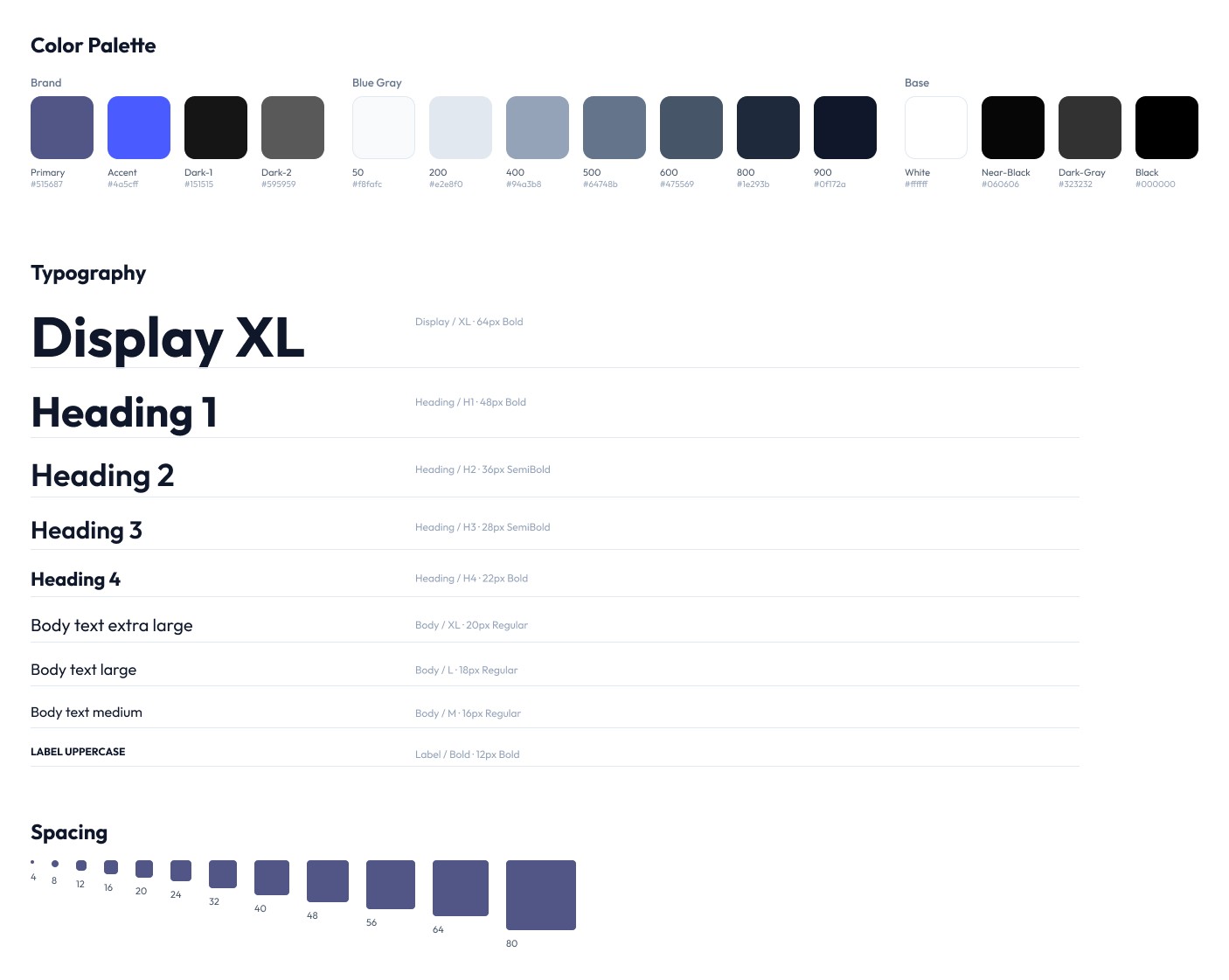
Foundations · Layer 1
Every token defined as a Figma Variable. Real hex values, semantic names, full spacing scale, not a guess, not a template.
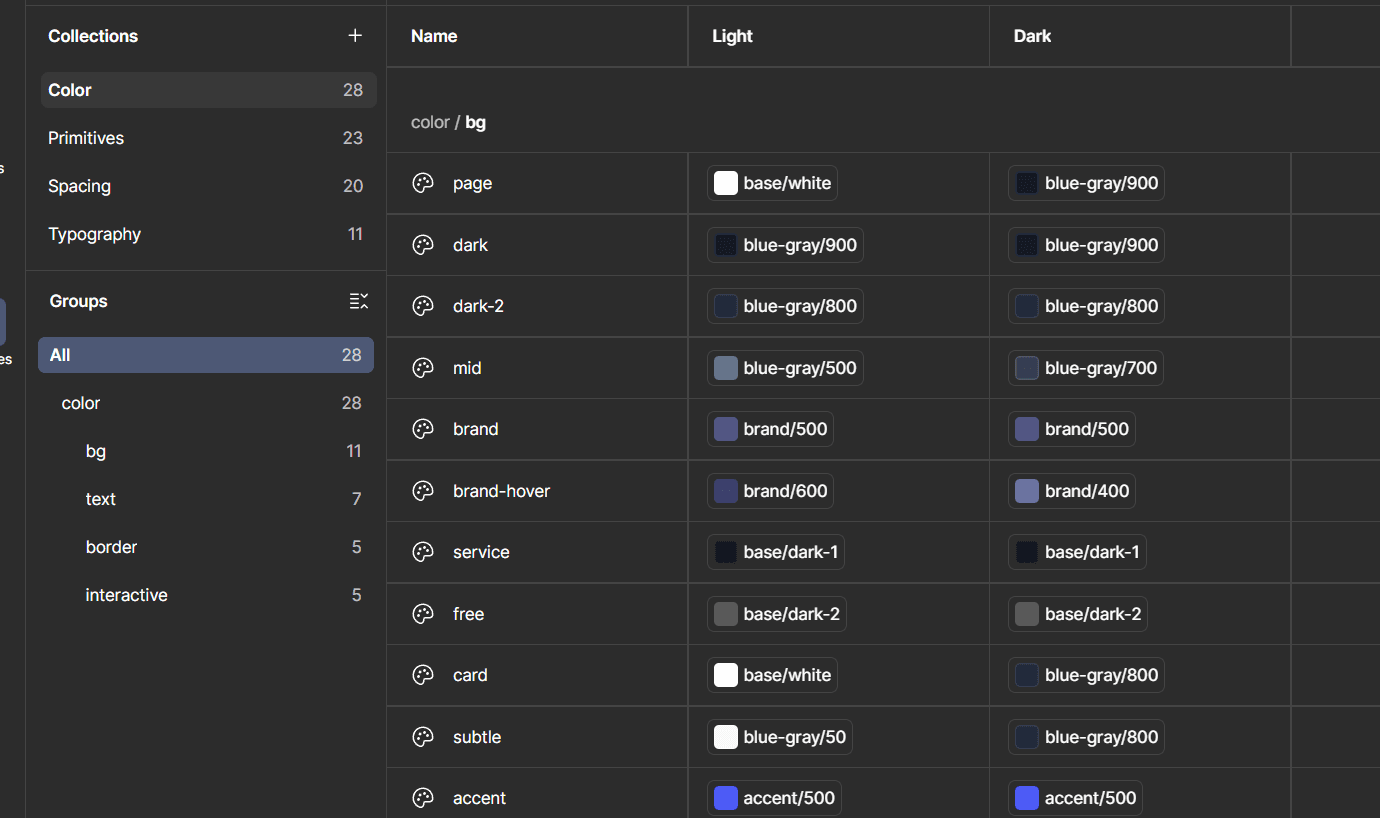
Components · Layer 2
Every component is built on top of the token layer, no hex codes in components, only variable references. Change a token, the whole system updates.
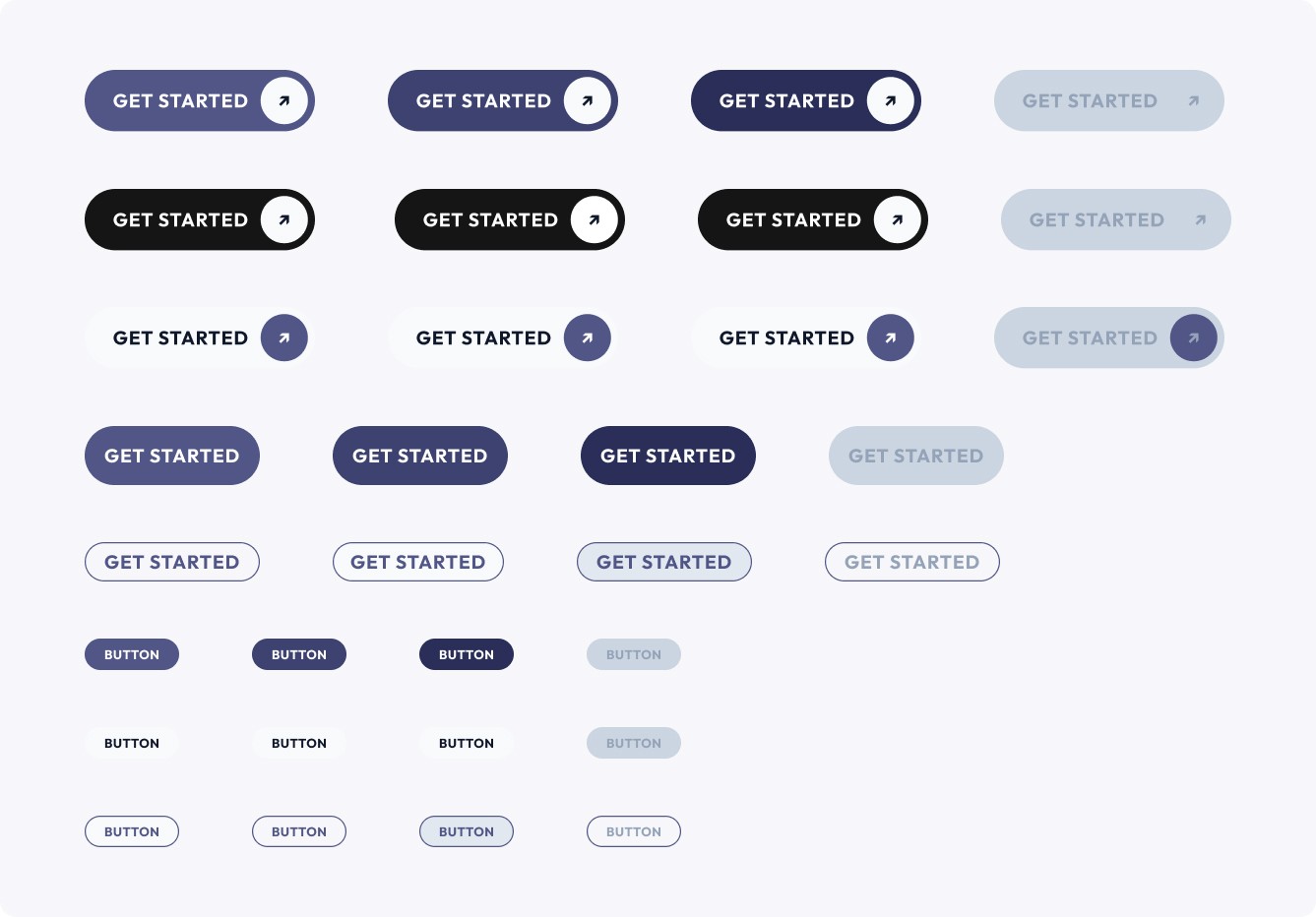
Deep Dive · Buttons
The first component I built. Primary, Secondary, and Outline, two sizes each, all four interactive states. Built with slot architecture so icon presence is a property, not a separate component.
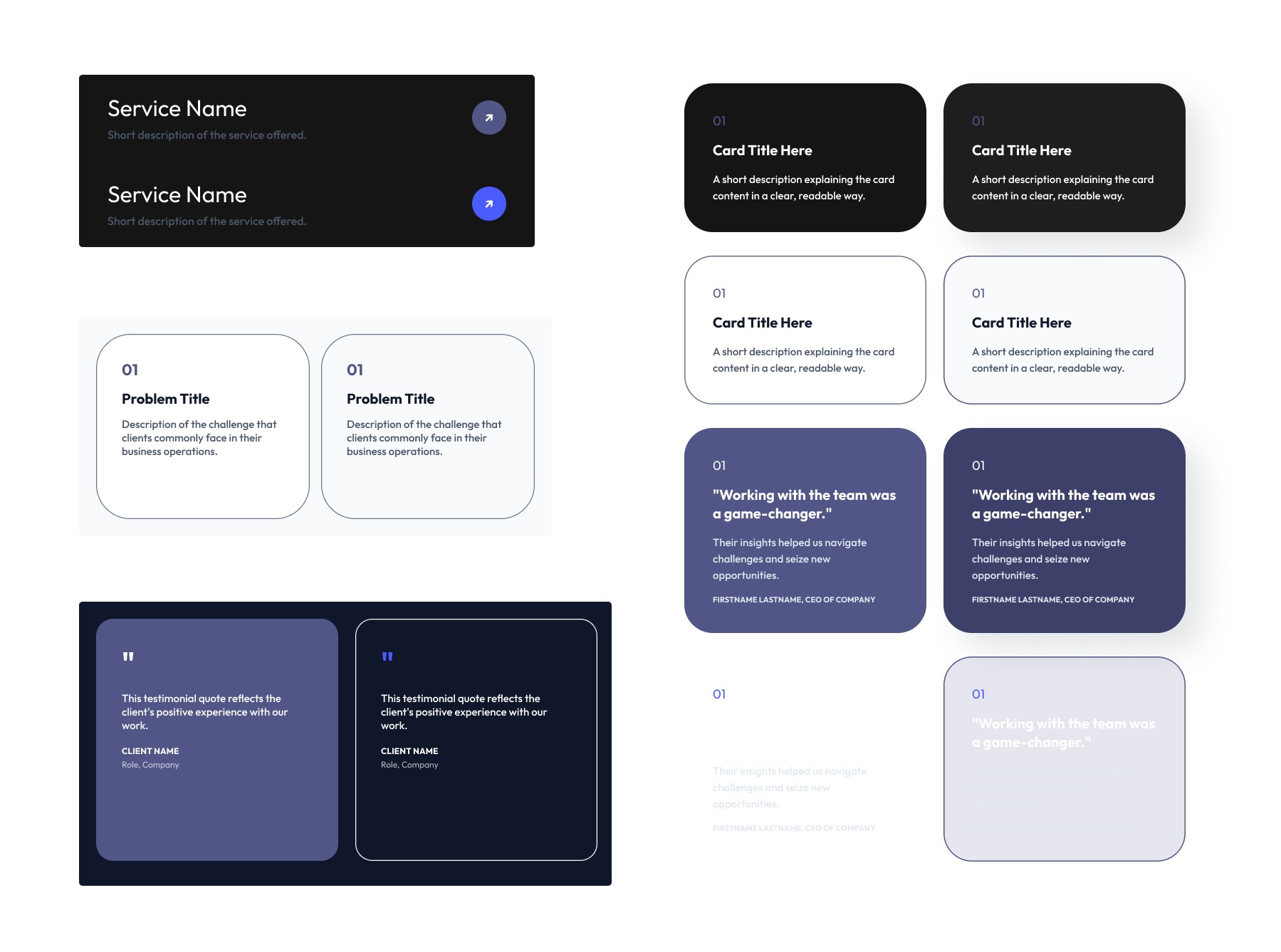
Deep Dive · Cards + Forms
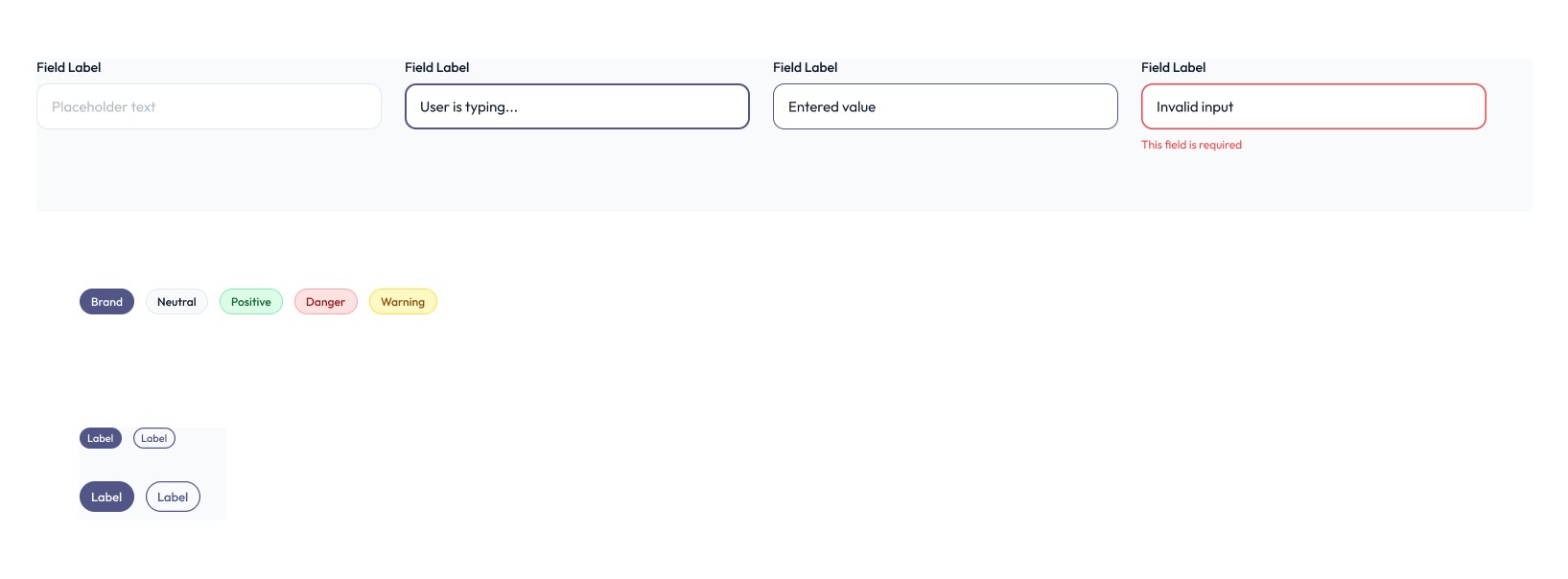
Three purpose-built card types (Service, Problem, Testimonial) and a complete form system, inputs across all four states, plus semantic tags and badges.
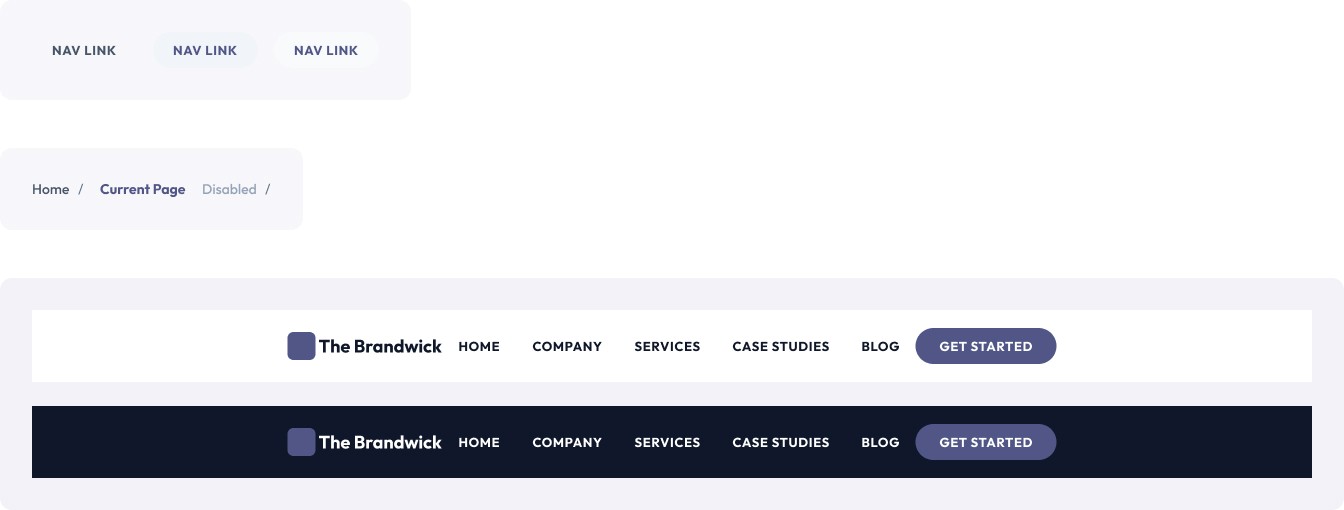
The Navbar uses NavItem as a nested component, light and dark variants of the full bar. Also created breadcrumb states (default, active, disabled).
In Practice · Landing Page
The system, applied.
The redesigned landing page was the first real test of the system. Very minimal components were built during this phase, most of them were all already there.
Minimal hero
Modern first impression; stats surfaced immediately, 8+ yrs, 100% satisfaction, 70+ projects. Credibility before the scroll.
Problem framinG
"Are you running into these problems?", services framed around pain, not pitch. Swap in ProblemCard component, done.
minimal new components
Every element on the landing page came from the library. That's the payoff of building the system first.
Outcomes :
Faster page design
With every token and component already defined, the landing page came together in a fraction of the time it would've taken without the system.
Zero inconsistency
No hardcoded values anywhere in the file; every color, type size, and spacing decision flows through variables, so the design can't drift.
Handoff-ready
The system is structured so a developer can pick it up directly, with semantic token naming and complete state coverage on every component.
What I'd do again:
I had some reflections by the end of this project :
Build the system before the page
The delayed gratification is real, but so is the compound return. Every page after the first is noticeably faster to design.
Start with color and type, not layout
Foundations lock in the brand's feeling before a single component exists. If the palette is right, almost any layout works.
Build all states from day one
Hover and disabled states are not edge cases. They're the difference between a component library and a screenshot library.
More Projects


Design System
Website Redesign
AI Native
brandwick design system
Built from scratch, a complete, scalable component library for a full website overhaul. Every token, every variant, every state defined before a single page was designed.
Year :
2025 - Present
Role :
● UX Designer
● Web Developer
Team :
● UX Designer (me!)
● 2 Developers
Skills :
● AI Workflow
● UX Research
● Web Development
● Prototyping
The Approach
System before screens.
Most website projects start with wireframes. This one started with tokens. Before a single page was designed, the entire design language, colors, type, spacing, components, was locked in and connected through Figma Variables.
Phase 1
FOUNDATIONS
Color palette, type scale, spacing system, all defined as Figma Variables with semantic naming, so changes cascade everywhere automatically.
Phase 2
COMPONENTS
Atoms to organisms; every component built with Auto Layout, connected to tokens, and shipped with all interactive states from day one.
Phase 3
PAGES
Only after the system was stable did page design begin. Landing page was the first stress-test, everything snapped into place.
AI-Native Workflow
How I used Claude Code + Figma MCP.
This project was built with an AI-assisted workflow from the start, not as a shortcut, but as a force multiplier for doing more rigorous system work faster.
Claude Code
→ Generated token naming conventions and variable collection structures at scale
→ Helped document component usage guidelines and accessibility notes rapidly
→ Iterated on spacing scales and type pairings through conversational prompting
Figma MCP
→ Connected Claude directly to the Figma file, read component structures, layer names, and variable trees
→ Audited design consistency across pages programmatically, flagged mismatched styles instantly
→ Enabled a faster feedback loop between design intent and system documentation
The AI tools didn't design for me. They handled the cognitive overhead of system bookkeeping, so I could focus on the decisions that actually required taste.
Foundations · Layer 1
Every token defined as a Figma Variable. Real hex values, semantic names, full spacing scale, not a guess, not a template.
Components · Layer 2
Every component is built on top of the token layer, no hex codes in components, only variable references. Change a token, the whole system updates.
Deep Dive · Buttons
The first component I built. Primary, Secondary, and Outline, two sizes each, all four interactive states. Built with slot architecture so icon presence is a property, not a separate component.
Deep Dive · Cards + Forms
Three purpose-built card types (Service, Problem, Testimonial) and a complete form system, inputs across all four states, plus semantic tags and badges.
The Navbar uses NavItem as a nested component, light and dark variants of the full bar. Also created breadcrumb states (default, active, disabled).
In Practice · Landing Page
The system, applied.
The redesigned landing page was the first real test of the system. Very minimal components were built during this phase, most of them were all already there.
Minimal hero
Modern first impression; stats surfaced immediately, 8+ yrs, 100% satisfaction, 70+ projects. Credibility before the scroll.
Problem framinG
"Are you running into these problems?", services framed around pain, not pitch. Swap in ProblemCard component, done.
minimal new components
Every element on the landing page came from the library. That's the payoff of building the system first.
Outcomes :
Faster page design
With every token and component already defined, the landing page came together in a fraction of the time it would've taken without the system.
Zero inconsistency
No hardcoded values anywhere in the file; every color, type size, and spacing decision flows through variables, so the design can't drift.
Handoff-ready
The system is structured so a developer can pick it up directly, with semantic token naming and complete state coverage on every component.
What I'd do again:
I had some reflections by the end of this project :
Build the system before the page
The delayed gratification is real, but so is the compound return. Every page after the first is noticeably faster to design.
Start with color and type, not layout
Foundations lock in the brand's feeling before a single component exists. If the palette is right, almost any layout works.
Build all states from day one
Hover and disabled states are not edge cases. They're the difference between a component library and a screenshot library.
More Projects
Design System
Website Redesign
AI Native
brandwick design system
Built from scratch, a complete, scalable component library for a full website overhaul. Every token, every variant, every state defined before a single page was designed.
Year :
2025 - Present
Role :
● UX Designer
● Web Developer
Team :
● UX Designer (me!)
● 2 Developers
Skills :
● AI Workflow
● UX Research
● Web Development
● Prototyping
The Approach
System before screens.
Most website projects start with wireframes. This one started with tokens. Before a single page was designed, the entire design language, colors, type, spacing, components, was locked in and connected through Figma Variables.
Phase 1
FOUNDATIONS
Color palette, type scale, spacing system, all defined as Figma Variables with semantic naming, so changes cascade everywhere automatically.
Phase 2
COMPONENTS
Atoms to organisms; every component built with Auto Layout, connected to tokens, and shipped with all interactive states from day one.
Phase 3
PAGES
Only after the system was stable did page design begin. Landing page was the first stress-test, everything snapped into place.
AI-Native Workflow
How I used Claude Code + Figma MCP.
This project was built with an AI-assisted workflow from the start, not as a shortcut, but as a force multiplier for doing more rigorous system work faster.
Claude Code
→ Generated token naming conventions and variable collection structures at scale
→ Helped document component usage guidelines and accessibility notes rapidly
→ Iterated on spacing scales and type pairings through conversational prompting
Figma MCP
→ Connected Claude directly to the Figma file, read component structures, layer names, and variable trees
→ Audited design consistency across pages programmatically, flagged mismatched styles instantly
→ Enabled a faster feedback loop between design intent and system documentation
The AI tools didn't design for me. They handled the cognitive overhead of system bookkeeping, so I could focus on the decisions that actually required taste.
Foundations · Layer 1
Every token defined as a Figma Variable. Real hex values, semantic names, full spacing scale, not a guess, not a template.
Components · Layer 2
Every component is built on top of the token layer, no hex codes in components, only variable references. Change a token, the whole system updates.
Deep Dive · Buttons
The first component I built. Primary, Secondary, and Outline, two sizes each, all four interactive states. Built with slot architecture so icon presence is a property, not a separate component.
Deep Dive · Cards + Forms
Three purpose-built card types (Service, Problem, Testimonial) and a complete form system, inputs across all four states, plus semantic tags and badges.
The Navbar uses NavItem as a nested component, light and dark variants of the full bar. Also created breadcrumb states (default, active, disabled).
In Practice · Landing Page
The system, applied.
The redesigned landing page was the first real test of the system. Very minimal components were built during this phase, most of them were all already there.
Minimal hero
Modern first impression; stats surfaced immediately, 8+ yrs, 100% satisfaction, 70+ projects. Credibility before the scroll.
Problem framinG
"Are you running into these problems?", services framed around pain, not pitch. Swap in ProblemCard component, done.
minimal new components
Every element on the landing page came from the library. That's the payoff of building the system first.
Outcomes :
Faster page design
With every token and component already defined, the landing page came together in a fraction of the time it would've taken without the system.
Zero inconsistency
No hardcoded values anywhere in the file; every color, type size, and spacing decision flows through variables, so the design can't drift.
Handoff-ready
The system is structured so a developer can pick it up directly, with semantic token naming and complete state coverage on every component.
What I'd do again:
I had some reflections by the end of this project :
Build the system before the page
The delayed gratification is real, but so is the compound return. Every page after the first is noticeably faster to design.
Start with color and type, not layout
Foundations lock in the brand's feeling before a single component exists. If the palette is right, almost any layout works.
Build all states from day one
Hover and disabled states are not edge cases. They're the difference between a component library and a screenshot library.